Beautiful Telemetry Overlays in Minutes
The native app for Mac and Windows. Build a custom telemetry overlay from gauges and templates, sync it to your footage, and export a true-alpha layer for any editor at native 4K speed.
free to try with a watermark, works fully offline
Works with the data you already record
Made with Overspeed
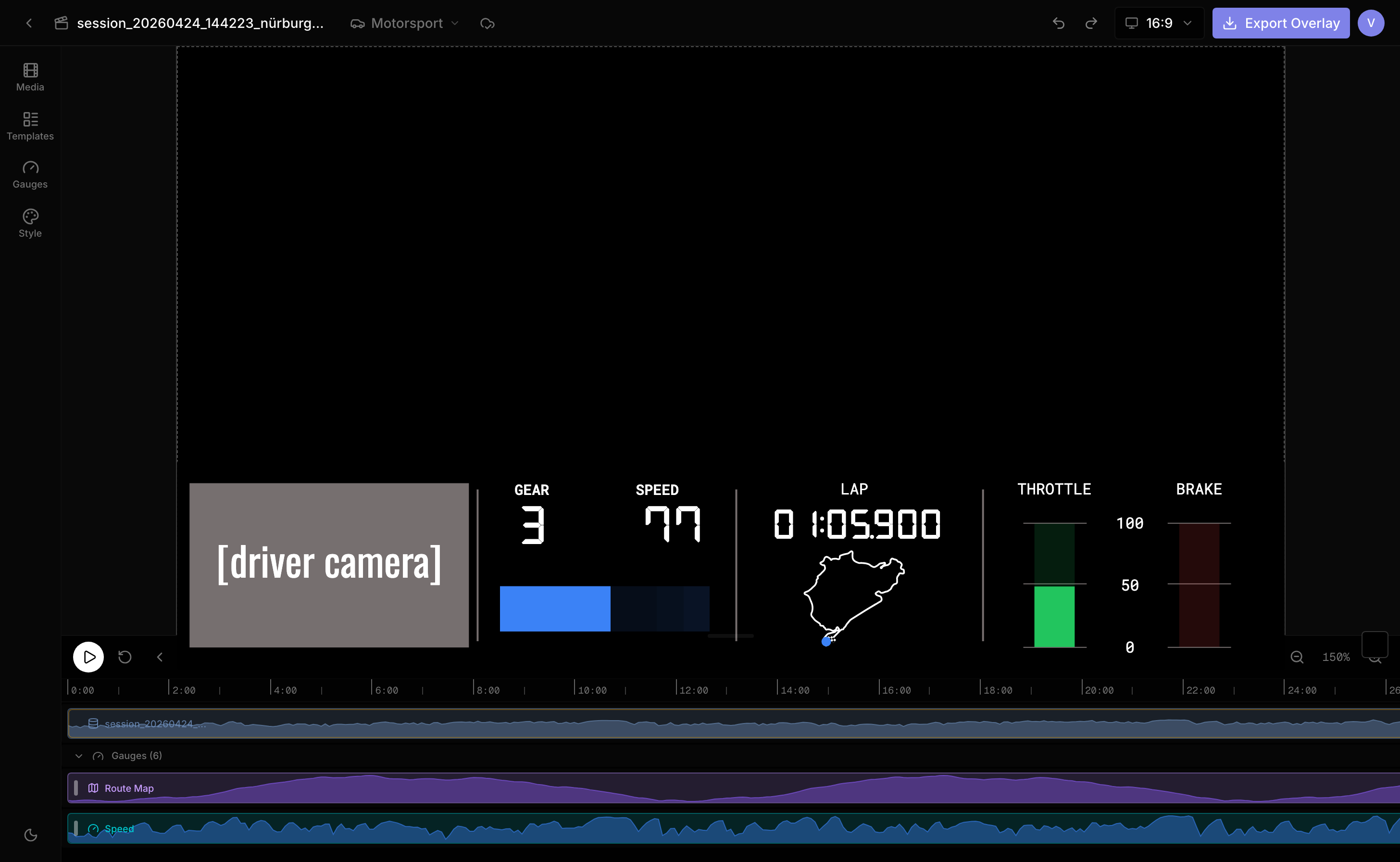
Real onboards, overlaid in Overspeed. Widescreen, vertical, or square, sized for wherever you post.
Your data. Your look.
Auto-generated overlays all look the same, and only show what your logging app decided matters. Overspeed is a pro editor for building a look that's unmistakably yours.
A real timeline, an extensive widget library with full styling control, and multiple telemetry files combined in one project. Save the result as a template and every video you post carries the same signature look.
A ready-made widget library
Professionally designed, animated gauges for everything you log, so there's no design work to start. Restyle any of them to match your look, like the live previews here.
Design any widget with AI
Not in the library? Describe it. The AI Studio turns a short prompt into a custom, fully styled widget, then refines it in plain language. Tweak every detail and save it to reuse on every video.
Add your style and branding
Create a look that's unmistakably yours and reuse it on every video you post.
Drag anywhere
Position and scale every gauge directly on the preview. What you place is exactly what renders.
186
KM/H
Colors, fonts & layouts
Every gauge comes in multiple layouts and is configurable down to the last detail — pick the look, then match colors and fonts to your team livery or channel branding.
A real timeline
Every gauge lives on its own track. Control exactly when it shows, hides, and fades. Bring the lap timer in at the start line, drop the map after sector one.
Your signature look
Save your own templates and apply them to every session with the same branding on YouTube, Instagram, and TikTok.
YouTube
TikTok
Easy data import
Simple, but powerful. Overspeed reads CSV, FIT, and VBO logs from action cams, bike computers, lap timers, and data loggers.
Map CSV Columns
session_nurburgring_lap1.csv · 62,539 rows
Time Reference
Syncs data with your video
Data Fields · 15 mapped
Auto-detectExport the overlay. Finish anywhere.
Your gauges, render-ready. Overspeed exports the overlay layer matched to your footage. Drop it over your video in the editor you already use.
Matched to your footage
Pick the resolution and frame rate of your edit, up to 4K at 60 fps, widescreen or vertical, so the overlay sits straight over your footage.
Drops into any editor
The overlay renders on a chroma-key background. Key it out in one step in CapCut, Premiere, DaVinci Resolve, or Final Cut and the gauges sit right on your video.
Built for every discipline
If it moves and it logs data, Overspeed can put that story on screen.
One tool for your telemetry videos
Pay once, with no subscriptions or auto-renew. The free tier gives you one cloud project with a watermark, so you can try everything first.
3 Months
$29
One payment · no renewal
Try the full pipeline for a season.
- 150 AI Studio tokens included
- Up to 5 cloud projects
- Up to 5 cloud templates
- Custom image overlays
- No watermark
1 Year
$59
One payment · no renewal
The whole season, comfortably.
- 300 AI Studio tokens included
- Unlimited cloud projects
- Unlimited cloud templates
- Custom image overlays
- No watermark
- Priority support
Lifetime
$119
One payment · forever
Every future paid feature included.
- 600 AI Studio tokens included
- Everything in 1 Year
- No expiry, ever
- Future paid features included
- Priority support
Frequently asked questions
How is this different from the overlay my logging app generates?
Apps like RaceChrono render one fixed overlay with limited styling, showing only the channels they support. Overspeed is a full editor: pick from an extensive widget library, or describe a custom one and the AI Studio builds it, style everything to match your channel, combine multiple data files, and save the result as a template you reuse on every video.
Can I create a widget that is not in the library?
Yes. The AI Studio turns a short prompt into a custom, fully styled widget, then refines it in plain language. Tweak every detail and save it to your library to reuse on every video.
Does Overspeed export a finished video?
No. Overspeed exports the overlay layer only: your gauges rendered on a chroma-key background. You can load your footage into the editor as a reference, which makes it much easier to design gauges, place them, and sync them to the action, but the export is just the overlay. Drop it over your video in any editor, key out the background, and you are done.
Does my footage get uploaded anywhere?
Your video files never leave your machine. Editing and rendering happen right on your Mac or Windows, and projects work fully offline. Only your telemetry and layouts sync, as an optional cloud backup, so your work can follow you across devices.
Which telemetry formats are supported?
CSV exports from tools like RaceChrono and most lap timers, Garmin FIT files, and RaceLogic VBO logs. You can add several files to one project, such as a lap timer log plus OBD data, and column detection maps speed, GPS, lap, and G-force automatically, with manual remapping for anything else.
Is there a free tier?
Yes. Signed-in users get one cloud project with a watermark on exports, enough to run a full session through the editor before paying.
Do I need to install anything?
Yes. Overspeed is a native desktop app for Mac and Windows. Download it, install it, and you are ready to build. Once installed it works fully offline.
Is it a subscription?
No. Every plan is a one-time payment for 3 months, 1 year, or lifetime access. Nothing auto-renews, and refunds are available within the first 14 days.
What export formats can I render?
Overlay clips as H.264 MP4 or VP9 WebM on a chroma-key background (magenta, green, or blue), up to 4K at 24, 30, or 60 fps, in widescreen, vertical, or square. Every editor with a chroma-key or green-screen tool, like CapCut, Premiere, DaVinci Resolve, or Final Cut, removes the background in one step.
Make your footage look broadcast-grade
Pick a template or build your own look, drop in your data, and export an overlay ready for your next edit.